
L’éditeur de banques de sons a enregistré le piano personnel de Marcus Warner, un Blüthner Style VII de 1907 restauré en 2021… Lire la suite sur Audiofanzine

L’éditeur de banques de sons a enregistré le piano personnel de Marcus Warner, un Blüthner Style VII de 1907 restauré en 2021… Lire la suite sur Audiofanzine

La marque regroupe six de ses banques de sons de pianos électriques au sein d’une collection complète… Lire la suite sur Audiofanzine

Présenté pendant le NAMM sur le stand Boutique Amps Distribution, le Royalist Preamp débarque chez les revendeurs… Lire la suite sur Audiofanzine

La pédale de fuzz d’inspiration vintage de SolidGoldFX est de retour dans une édition limitée aux couleurs de la Ford GT40… Lire la suite sur Audiofanzine

La Double Dragon est une pédale d’octaver analogique. Elle utilise la même technologie analogique que les grands classiques du genre. .. Lire la suite sur Audiofanzine
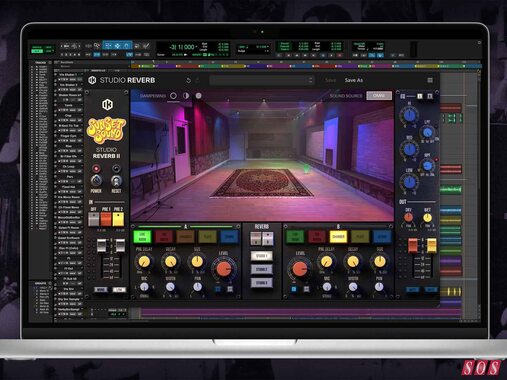
Sunset Sound Studio Reverb II is a new standalone and significantly expanded version of IK Multimedia’s popular T-Racks plug-in.
Fanan team has updated Closseum mini modular DAW to version 1.2 and announced 50% discount on second and subsequent purchases of the same pack.
Main changes:
IK Multimedia has announced the release of Sunset Sound Studio Reverb II, a major evolution of their acclaimed studio emulation.
Moving beyond its origins as a T-RackS module, Version II arrives as a standalone powerhouse, significantly expanding the spatial depth and processing flexibility of the legendary Sunset Strip recording environment.
The update leverages IK’s proprietary Volumetric Response Modeling (VRM) technology to capture the acoustic nuances of Studios 1, 2, and 3. Unlike static convolution, VRM maintains the interaction between source position and room response, delivering the specific tone and movement heard on decades of iconic records.
The centerpiece of Version II is the new Live Room Positioning System. Users can now place sound sources in up to 27 distinct locations per studio. Because each position was captured as a unique acoustic event rather than being mathematically interpolated, the early reflections and boundary reinforcements remain authentic to the physical space.
Additionally, Studios 1 and 3 now feature modeled variable dampening, allowing users to adjust the studio’s physical absorption panels to reshape decay and tonal balance in real-time.
Sunset Sound Studio Reverb II introduces a dual independent reverb engine design. This allows for parallel routing of different spaces—for example, layering a Studio 1 Live Room with a vintage EMT plate or an AKG spring reverb. Each engine features its own EQ, stereo imaging, and routing controls.
The new Advanced Size Control goes beyond simple decay times. It dynamically scales impulse responses from 0% to 200% while preserving the original room’s tonal fingerprint. This enables engineers to shrink large rooms for tight percussion or expand small booths into cinematic environments without losing spatial coherence.
336 Stereo IRs: A massive expansion of the live room capture library.
Directional & Omni Modes: Choose how the source energizes the room (e.g., focused dispersion for vocals vs. uniform propagation for drums).
Modeled Analog Paths: Selectable preamp emulations of the API/DeMedio Sunset Sound Custom and the Class-A Discrete NEVE 8880 consoles.
Modern Interface: A redesigned 3D UI for intuitive source positioning and routing.
Standalone & Plug-in: Works as a dedicated application or within any DAW.
Loyalty Discount: Existing owners of the original T-RackS Sunset Sound Studio Reverb are eligible for a $/€50 discount automatically applied at checkout for a limited time.

The Trails builds on the success of the Gliss, expanding on the idea of recordable touch control and presenting users with a fully polyphonic system that offers a fresh new take on music creation.

Arturia has unveiled the KeyStep 37 mk2, the next-generation of its versatile 37-key controller and sequencer.
Expanding on the first-edition KeyStep 37, the mk2 version brings a number of upgrades, including a clearer OLED display, expanded connectivity, a more powerful 64-step sequencer – with eight-voice polyphony – and a 16-mode arpeggiator and an overall refreshed design.
The KeyStep 37 mk2 also brings new generative tools like Mutate, Spice and a Phrase Arpeggiator, all of which transform sequences or arpeggios instantly without stopping the music. There’s also Scale and Chord Modes to assist with musical idea generation like harmonies or melodies.
The unit also boasts new physical controls, with five more keys, two additional buttons and four knobs to control sub-menus. The addition of new tactile controls, Arturia says, “drastically enhances the overall playability of the instrument while keeping the same amount of functionality”.
Users also get new visual feedback, with a strip of LEDs over the keybed which indicate the notes being played on the keyboard at a given time. Of course, you’ve also got pitch bend and mod strips, as well as 37 velocity-sensitive keys with aftertouch. There’s also four mode-aware encoder knobs for fast Seq/Arq/Chord/Mutate editing without having to “menu-dive”.
The KeyStep mk2’s aforementioned expanded connectivity means users can control modular, vintage and modern gear alike alongside your DAW, while there’s also a controllable CV/Gate, MIDI DIN, Sync I/O and USB-C.
KeyStep 37 mk2 is more than keys,” says Arturia. “It’s a sequencer, arpeggiator, and musical nerve-centre that bridges hardware and software so you can compose, jam, and perform anywhere your ideas take you.”
Price-wise, the KeyStep mk2 clocks in at €189, €60 over the first KeyStep’s €129 price tag. For more information, head to Arturia.
The post Arturia’s KeyStep 37 mk2 brings new generative tools to assist with forming musical ideas appeared first on MusicTech.


